
From Concept to Game-Ready: Modeling for Project Meridian
A behind-the-scenes look at our hard-surface modeling workflow, from sculpting and topology challenges to preparing 3D assets for Unreal Engine 5.
 FIELD NOTES / SIDE QUEST STUDIOS
 There’s something incredibly satisfying about watching a 3D model come together.
You start with a few primitive shapes, push some geometry around, carve out a handful of details, and eventually end up with something that actually looks like it belongs in a video game.
Of course, that’s usually when the real problems begin.
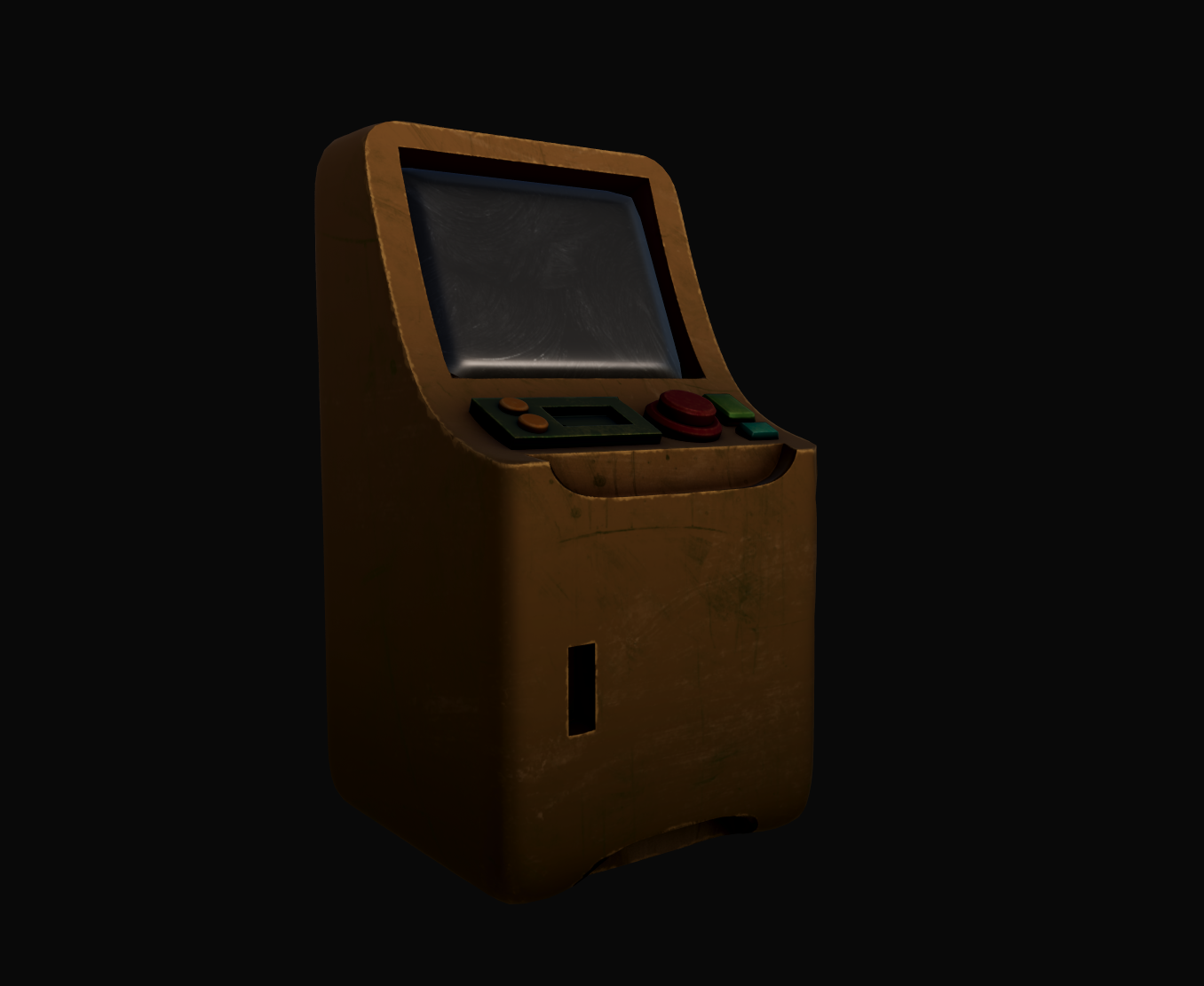
While developing Project Meridian, we’ve been spending a considerable amount of time refining our hard-surface modeling workflow, creating everything from environmental props to the computer terminals players will interact with throughout the game.
And if there’s one thing we’ve learned, it’s that making a model look good and making it work properly inside a game engine are two very different challenges.
Starting With the Silhouette
Our modeling process usually begins with relatively simple shapes.
Before worrying about tiny mechanical details, we’re interested in establishing the overall silhouette and proportions of an object.
For something like a computer terminal, that means thinking about the screen housing, supporting structure, buttons, and other elements that help communicate its purpose.
The goal is to create something recognizable and visually interesting before committing to the smaller details.
It’s tempting to jump straight into intricate modeling, but we’ve found that getting the larger forms right first makes everything else easier.
After all, there’s not much point in spending an hour detailing a component that ends up getting redesigned.
The Beauty—and Frustration—of Boolean Modeling
One of the techniques we’ve been experimenting with extensively is Boolean modeling in ZBrush.
Booleans allow us to combine or subtract shapes to create mechanical cutouts, recessed screens, openings, and other hard-surface details.
For developing complex forms quickly, they’re incredibly useful.
But they also come with a catch.
The resulting geometry isn’t always particularly friendly when it’s time to move the model into another application.
We’ve encountered situations where a model looks perfectly fine inside ZBrush, only to reveal shading problems, irregular topology, or distorted surfaces after being imported into Maya.
Some of our experiments with ZRemesher have also demonstrated how difficult it can be to preserve clean mechanical edges when automatically rebuilding geometry.
It’s been a valuable reminder that a visually successful modeling operation doesn’t necessarily produce ideal topology.
Understanding Why Topology Matters
Topology is one of those subjects that becomes increasingly important the deeper you get into 3D modeling.
At first, it’s easy to focus entirely on the surface appearance of an object.
But the arrangement of vertices, edges, and polygons affects how that object behaves when subdivided, shaded, unwrapped, and exported.
We’ve run into issues where subdividing seemingly simple primitives produces unexpected surface artifacts.
We’ve also encountered situations where automated remeshing interrupts corners and other important hard-surface features.
These problems have encouraged us to become more deliberate about how we construct geometry.
Sometimes the fastest modeling technique isn’t the best choice for the final asset.
And sometimes rebuilding a section with cleaner topology is more efficient than spending hours trying to repair problematic geometry.
Moving Between ZBrush and Maya
Our workflow frequently involves moving assets between ZBrush and Maya.
Each application offers different strengths.
ZBrush is particularly useful for experimenting with shapes, cutting mechanical details, and rapidly exploring forms.
Maya gives us additional control when we need to inspect geometry, organize individual components, and prepare models for the next stages of production.
The challenge is making sure those applications agree about what we’ve created.
We’ve encountered export issues involving FBX files, unexpected shading behavior, and geometry that doesn’t transfer quite the way we intended.
Troubleshooting these problems has become an important part of refining our workflow.
It’s not always glamorous work, but every issue we solve makes the next asset a little easier to produce.
Preparing Assets for Unreal Engine 5
Once we’re satisfied with a model, the next challenge is making sure it works efficiently inside Unreal Engine.
That involves considering more than just its appearance.
Polygon counts, UV layouts, materials, and the way individual components are organized all affect how practical an asset will be to use.
For example, we’ve experimented with detailed environmental props containing tens of thousands of triangles.
That isn’t automatically a problem, particularly when an asset appears only a limited number of times.
But it’s still important to understand where that complexity comes from and whether it’s contributing something meaningful to the final result.
A tiny mechanical detail that players will never notice probably doesn’t need the same geometric attention as the main silhouette of an object.
We’re learning to make those decisions more intentionally.
Building Assets That Belong in the World
Technical considerations are important, but they aren’t the only thing driving our modeling decisions.
We also want our assets to feel like they belong in Project Meridian.
A terminal isn’t just a screen attached to a box.
It’s a piece of equipment that someone in this world would have designed, manufactured, installed, and used.
That influences the proportions, materials, mechanical details, and overall visual language of the object.
As we continue developing the G.R.A.C.E. facility, we’re trying to establish a consistent design identity across its equipment and environments.
The more those elements feel connected, the more believable the world becomes.
The Process Is Part of the Progress
One of the interesting things about learning and refining a production workflow is realizing how much time goes into work that players may never consciously notice.
Clean topology.
Proper UV layouts.
Reliable exports.
Reasonable polygon counts.
None of those things is particularly exciting on its own.
But together, they allow us to create assets that look good, behave predictably, and integrate smoothly into the game.
And that’s ultimately what we’re working toward.
We’re not just trying to make cool-looking 3D models.
We’re trying to build a world full of objects that feel like they belong there.
Even if getting them into the engine occasionally requires arguing with an FBX file for an afternoon.